


Description
The Noctua NF-A8 PWM is a premium 80 × 80 × 25 mm, 12V, four-wire PWM fan for quiet rear airflow on compatible NerdQaxe-family miners and other 12V systems. Solo Satoshi uses this model as the optional rear fan in its NerdQaxe++ cooling configuration.
Noctua NF-A8 PWM Specifications
| Specification | Without Low-Noise Adapter | With Low-Noise Adapter |
|---|---|---|
| Dimensions | 80 × 80 × 25 mm without anti-vibration pads | |
| Voltage / maximum input | 12V DC / 0.96W maximum | |
| Connector | Standard four-pin PWM; 200 mm primary cable | |
| Maximum speed | 2200 RPM ±10% | 1750 RPM |
| Maximum airflow | 55.5 m³/h (32.7 CFM) | 43.9 m³/h (25.8 CFM) |
| Maximum static pressure | 2.37 mm H₂O | 1.54 mm H₂O |
| Maximum noise | 17.7 dB(A) | 13.8 dB(A) |
| Bearing / MTTF | SSO2 / greater than 150,000 hours | |
| Manufacturer warranty | 6 years | |
NerdQaxe Compatibility
| Miner | Compatibility |
|---|---|
| NerdQaxe++ | Compatible as an 80mm 12V rear fan when the miner has a suitable mount or stand. Official hardware files show two standard four-pin PWM headers supplied from the 12V rail. |
| NerdQaxe+ | Compatible with revisions that provide a standard 12V PWM header and an appropriate 80mm mounting solution. Confirm the exact board revision first. |
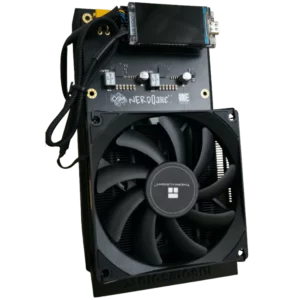
This 80mm fan does not directly replace the primary 92mm slim fan supplied with many current NerdQaxe++ cooler assemblies. It is most useful as directed rear airflow across the board, voltage regulators, and the back of the PCB. A bracket, stand, grill, and mounting hardware appropriate to the miner may be required.
What the Low-Noise Adapter Changes
The included NA-RC7 Low-Noise Adapter caps maximum fan speed at 1750 RPM. That reduces published airflow, static pressure, and noise at the same time. For a miner, quieter is not automatically safer: test the fan first without the adapter, monitor ASIC and regulator temperatures under sustained load, and use the adapter only when sufficient thermal margin remains.
Installation and Airflow
- Shut down the miner, disconnect DC power, and allow the heatsink to cool.
- Confirm the selected header supplies 12V and follows the standard four-pin PWM pinout.
- Install the fan in an 80mm mount with the airflow arrows facing the intended direction. For rear cooling, create a clear front-to-back or side-to-side path rather than recirculating hot air.
- Keep the cable away from blades, heatsink edges, exposed terminals, and hot components.
- Connect directly to a suitable header or use the supplied extension if needed. Do not exceed the header’s current capacity when using the included Y-cable.
- Start at stock miner settings and confirm fan rotation, RPM reporting, PWM response, ASIC temperature, and regulator temperature.
- Recheck temperatures after the miner reaches thermal equilibrium and whenever frequency, voltage, ambient temperature, or fan configuration changes.
Manufacturer Scope of Delivery
- 1 × Noctua NF-A8 PWM fan
- 1 × NA-RC7 Low-Noise Adapter
- 1 × NA-YC1 four-pin Y-cable
- 1 × NA-EC1 30 cm extension cable
- 4 × anti-vibration mounts
- 4 × fan screws
Helpful Guides and Compatible Hardware
NerdQaxe++ Bitcoin Solo Miner
The supported 12V multi-chip miner configuration in which Solo Satoshi uses the NF-A8 as a rear fan.
NerdQaxe++ Display Stand
Review stand and clearance requirements when planning rear airflow around the board.
Thermalright AXP90-X47 Full Copper Cooler
A primary heatsink and 92mm-fan upgrade; the NF-A8 can complement it as rear board airflow.
Choosing the Best Bitaxe Cooling Solution
Understand airflow direction, heatsink contact, fan voltage, static pressure, and thermal monitoring.
Official Noctua Documentation
The following manufacturer PDFs are hosted in the Solo Satoshi media library for convenient reference.
Is the Noctua NF-A8 PWM a 5V or 12V fan?
Does it work with the NerdQaxe++?
Does it replace the NerdQaxe++ primary cooler fan?
Can I use it on a Bitaxe Gamma, Supra, Ultra, or Max?
What are the maximum speed and airflow?
How loud is it?
What does the Low-Noise Adapter do?
Does it support PWM speed control and RPM monitoring?
What is included by Noctua?
How should I orient it as a rear fan?
Should I use the included Y-cable on a miner?
Where can I find the official specifications?



Reviews
There are no reviews yet.