


Description
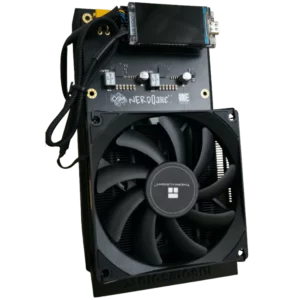
The Nerdaxe Gamma is an open-source, Wi-Fi Bitcoin miner built around one Bitmain BM1370 SHA-256 ASIC and a LILYGO T-Display S3 controller. Revision 2.3 combines approximately 1.2 TH/s at typical stock settings with a 1.9-inch color display that presents miner information directly on the device.
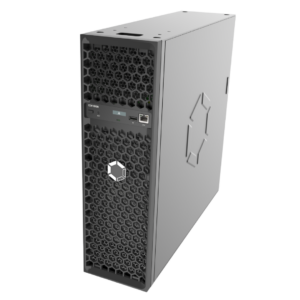
This listing lets you choose the miner by itself, add a region-appropriate 5V power supply, add the upright stand, or select both accessories. Review the selected Power Supply and Stand options before checkout; unselected accessories are not included.
Nerdaxe Gamma Revision 2.3 Specifications
| Specification | Verified details |
|---|---|
| Hardware revision | 2.3 |
| Algorithm | SHA-256 |
| ASIC | 1 × Bitmain BM1370 |
| Nominal hashrate | Approximately 1.2 TH/s at typical stock settings |
| Typical miner power | Approximately 18W at typical stock settings; settings, silicon, cooling, and PSU losses affect results |
| Controller | LILYGO T-Display S3 with ESP32-S3 |
| Display | 1.9-inch color LCD with multiple status screens |
| Connectivity | 2.4 GHz Wi-Fi |
| Power input | 5V DC, 5A minimum; supply should provide more than 25W |
| DC connector | 5.5 × 2.1 mm center-positive barrel connector |
| Power regulation | Texas Instruments TPS546D buck regulator for the BM1370 rail |
| Fan control | Microchip EMC2101 PWM fan controller and tachometer monitoring |
| Firmware | Open-source ESP-Miner Nerdaxe firmware |
| Warranty | 90-day Solo Satoshi warranty |
For engineering reference, view the locally hosted official Nerdaxe Gamma revision 2.3 schematic (PDF).
Color Display and Browser Control
The larger color screen is the defining Nerdaxe difference. It cycles through multiple views for information such as hashrate, accepted work, uptime, fan speed, power, pool status, network statistics, and Bitcoin market data as supported by the installed firmware. The embedded ESP32-S3 also hosts the local web interface, so a separate computer is not required after configuration.
Display values are monitoring estimates, not calibrated laboratory instruments. Confirm stability in the browser dashboard and at the pool by checking accepted shares, rejected shares, hashrate over time, temperature behavior, fan operation, and error rate.
Setup: From Wi-Fi to Accepted Shares
- Place the miner upright on a stable, nonflammable surface with clear intake and exhaust airflow.
- Connect the selected or separately purchased compatible 5V power supply.
- Join the device setup network with a phone or computer and provide your 2.4 GHz Wi-Fi credentials.
- Open the miner’s local web interface and enter the pool URL, port, Bitcoin payout address, and worker name required by the chosen pool.
- Save the configuration and confirm that the pool reports accepted shares.
- Observe temperature, fan speed, power, errors, and hashrate before leaving the miner unattended.
Do not expose the local management interface directly to the public internet. Use a trusted home network, strong Wi-Fi security, and current firmware.
Nerdaxe Gamma vs. Bitaxe Gamma
| Feature | Nerdaxe Gamma v2.3 | Bitaxe Gamma 602 |
|---|---|---|
| ASIC | 1 × BM1370 | 1 × BM1370 |
| Nominal class | Approximately 1.2 TH/s | Approximately 1.2 TH/s |
| On-device display | 1.9-inch color T-Display S3 with multiple graphical screens | Compact monochrome status display |
| Controller | ESP32-S3 integrated with the display module | ESP32-S3 on the Bitaxe platform |
| Primary reason to choose it | Larger at-a-glance graphical display | Conventional Bitaxe form factor and ecosystem |
Both are open-source single-chip BM1370 miners. Neither produces guaranteed income, and measured hashrate, power, noise, and efficiency depend on firmware, settings, cooling, ambient conditions, and individual silicon.
Firmware Updates and Recovery
Use the Solo Satoshi Web Flasher to install supported firmware, selecting the NerdAxe Gamma target rather than a similarly named board. Use a data-capable USB-C cable, keep the device powered and connected during the process, and do not interrupt a flash.
Firmware builds and board targets change. Back up settings where supported and read the Web Flasher guide before updating or recovering a device.
Cooling, Tuning, and Maintenance
The board uses an EMC2101 controller for PWM fan control and tachometer monitoring. Keep the heatsink, fan, PCB, and display vents free of dust. Power the miner off and let it cool before cleaning. Never allow a tool, brush, or cloth to contact the powered board.
Frequency and voltage adjustments can increase hashrate, but they also increase heat, power demand, hardware errors, noise, and component stress. Begin with stock settings, establish a stable baseline, then make one small change at a time. Overclocking results are not guaranteed and may affect warranty coverage.
Solo Mining Expectations
A solo miner performs valid Bitcoin SHA-256 work, but discovering a block is a low-probability event. A Nerdaxe Gamma may run indefinitely without finding one. The block subsidy changes over time, transaction fees vary from block to block, and pool rules determine how a valid result is handled.
Choose a reputable pool, verify the payout address, understand fees and payout policy, and treat any block discovery as uncertain rather than expected daily revenue.
What’s Included
- 1 × assembled and tested Nerdaxe Gamma revision 2.3 miner
- 1 × quick-start/support card
- 1 × Solo Satoshi sticker
- Compatible power supply only when North America or EU-UK-AU is selected
- Upright stand only when Upright is selected
Why Buy From Solo Satoshi?
- Assembled and tested open-source mining hardware
- US inventory and support from Conroe, Texas
- 90-day warranty
- Clear package selections for power and stand options
- Direct access to the Solo Satoshi firmware flasher and educational guides
Helpful Guides and Tools
Solo Satoshi Web Flasher
Open the browser-based firmware flasher and select the NerdAxe Gamma target before connecting the device by USB-C.
Web Flasher Guide
Follow the preparation, browser, cable, backup, flashing, and recovery steps before changing firmware.
Open-Source Miner Setup Guide
Learn the standard Wi-Fi, pool, payout-address, worker, and accepted-share setup workflow.
AxeOS and ESP-Miner Guide
Understand the dashboard, operating values, pool settings, firmware controls, and monitoring concepts.
Overclocking and Cooling Guide
Review voltage, frequency, temperature, power, error-rate, and cooling tradeoffs before tuning.
Solo Mining Pool Guide
Compare pool architecture, fees, payout policies, URLs, ports, and trust assumptions.
Official Nerdaxe Documentation
The official project schematic is hosted in the Solo Satoshi media library for board-level reference and revision verification.
What is the Nerdaxe Gamma?
Which Nerdaxe Gamma revision is this?
How fast is the Nerdaxe Gamma?
How much power does the Nerdaxe Gamma use?
What power supply does the Nerdaxe Gamma require?
Is a power supply included?
Is the upright stand included?
Will the Solo Satoshi 40W 5V 8A power supply work?
Does the Nerdaxe Gamma need a computer to mine?
Which Wi-Fi band does it use?
What does the color screen show?
Can the Nerdaxe Gamma use the Solo Satoshi Web Flasher?
Can I overclock the Nerdaxe Gamma?
Can the Nerdaxe Gamma solo mine Bitcoin?
What is included in the base package?
What warranty is included?


Reviews for Nerdaxe Gamma Bitcoin Solo Miner (Revision 2.3 Model)
There are no reviews yet.