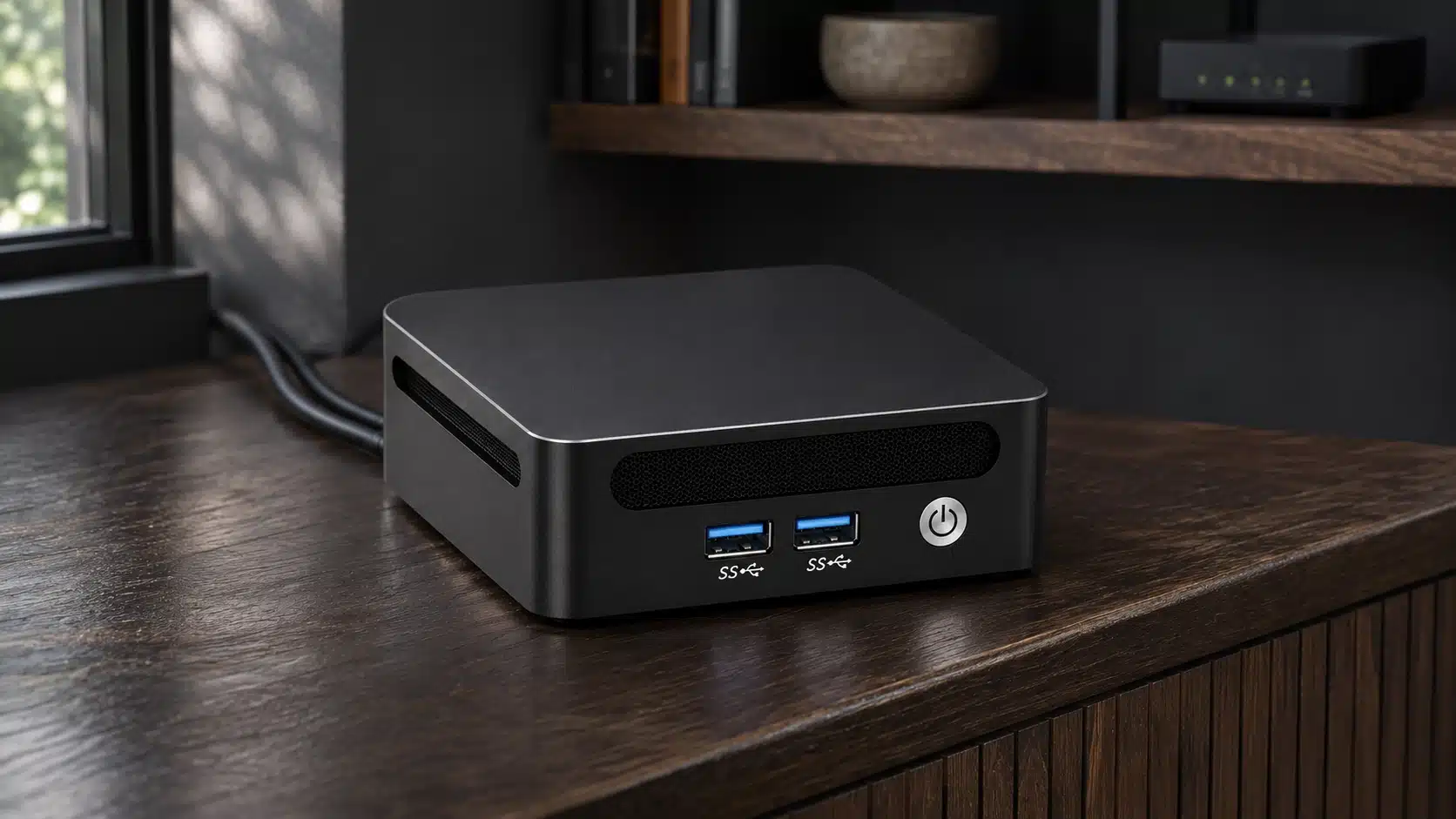
A Bitcoin node independently checks Bitcoin’s rules and gives your wallet or services a source of verified chain data you control. You can run one on suitable hardware you already own or use a dedicated server; storing the entire historical blockchain is optional when you use pruning.
This guide explains eight practical benefits, the differences between pruned and archival operation, hardware and software choices, setup, wallet connections, Lightning, and self-hosted mining. It also shows what a node does not provide automatically, so you can choose a setup for the services you actually plan to use.
Quick overview
- Main benefit: Your node validates Bitcoin’s consensus rules instead of relying exclusively on a public wallet server or explorer. It does not earn Bitcoin for validation, and operating one is separate from owning the keys that control your funds.
- Storage choice: An archival node retains historical block files; a pruned full node validates the chain but deletes older block files. Pruning saves disk space, while some indexes, wallet rescans, and packaged services require unpruned data.
- Privacy condition: Your wallet must actually connect to your node or its indexer to reduce public-server queries. A hardware wallet, Tor, or a running node by itself does not make transactions anonymous or guarantee that every wallet connection stays local.
- Hardware planning: An SSD is strongly recommended, with a 2 TB drive a practical starting point for archival operation and additional services. RAM, CPU, storage, and bandwidth depend on the chosen software; a Raspberry Pi 5 can be viable with a supported setup.
- Service differences: Lightning needs a suitable chain-data backend and channel safeguards. Self-hosted solo mining needs a Stratum server or gateway between the ASIC miner and the Bitcoin node; entering a Bitcoin Core RPC address into a miner is not sufficient.
- Successful setup: Install verified software, complete synchronization, connect the wallet to the intended backend, and confirm operation. Maintain updates, storage headroom, and backups, especially if the server holds wallet keys or Lightning channel data.
What Is a Bitcoin Node?
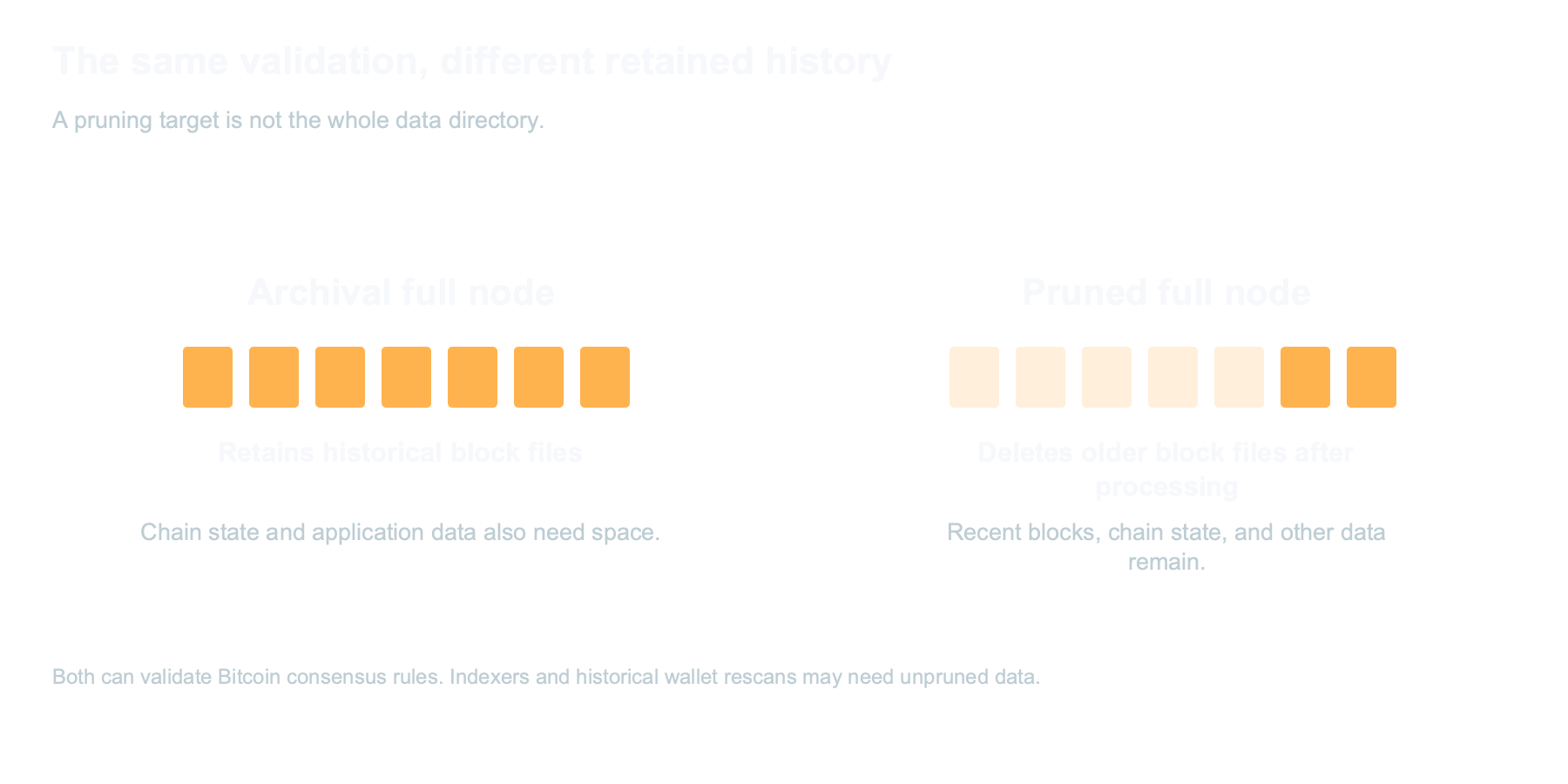
A Bitcoin full node is software that validates blocks and transactions against Bitcoin’s consensus rules and maintains the state needed to recognize valid spending. It can retain all historical block files as an archival node or discard older block files after processing them as a pruned full node.
The node checks proof of work, transaction spending conditions, double-spend rules, and the permitted creation of new coins. It follows the valid chain with the most accumulated work, rather than treating the number of connected peers as a vote. A Bitcoin node can run on a desktop, laptop, mini PC, single-board computer, or dedicated server that meets its software requirements.
Think of the blockchain as a history of accepted transfers and coin creation. Your node processes that history to establish which outputs remain unspent and which new transactions are valid. An archival node keeps the old block files available; a pruned node can perform full validation without retaining that complete archive. Neither mode requires your hardware wallet’s private keys.
These roles are related but distinct:
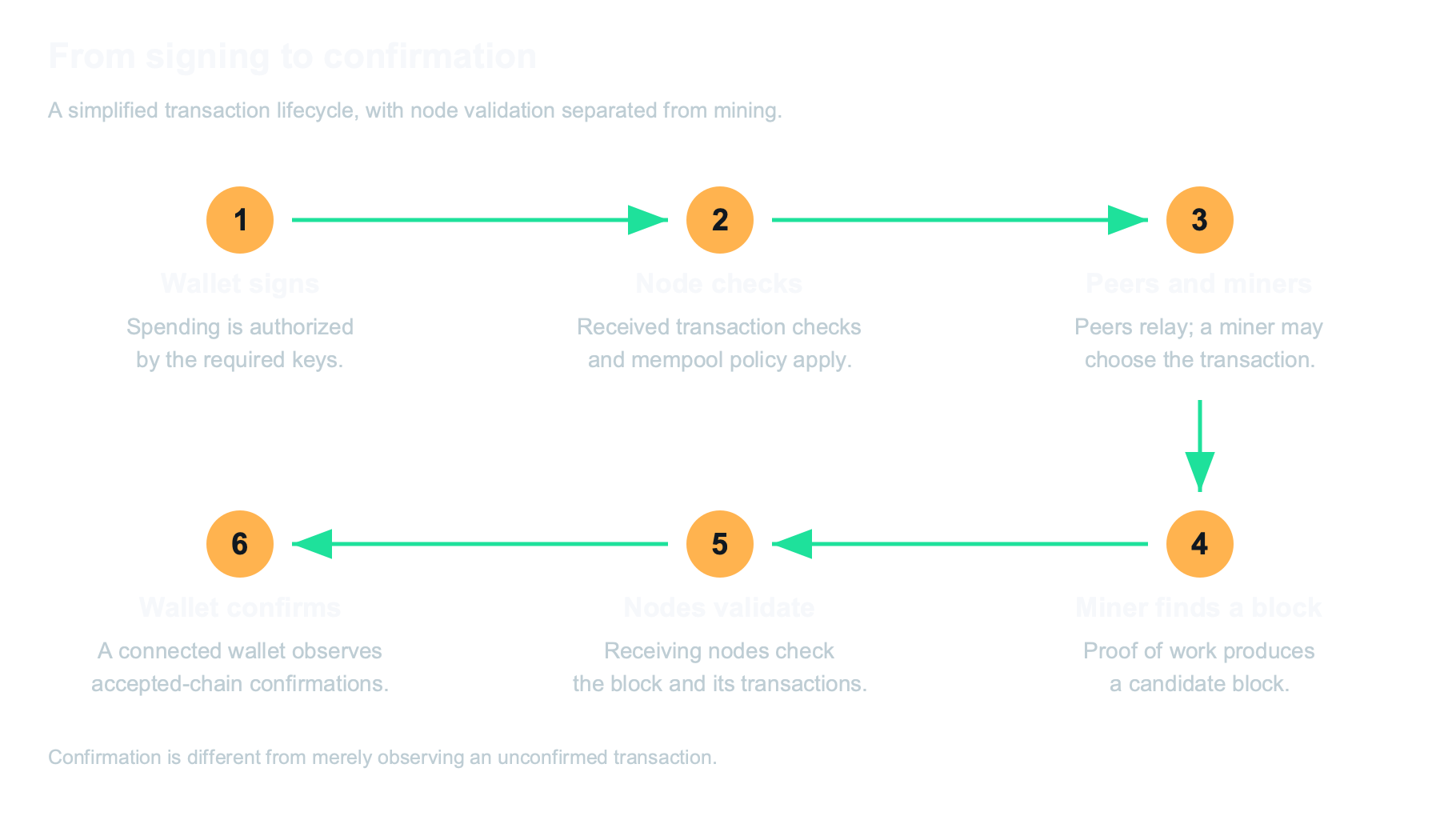
- Transaction validation: The node checks received transactions against spending and consensus requirements. Its mempool and relay policies additionally determine which unconfirmed transactions it accepts and forwards. Different nodes can have different mempools without disagreeing about the validity of a mined block.
- Block validation: The node checks proof of work and the block’s transactions. The permitted coinbase amount includes the block subsidy plus that block’s transaction fees, so comparing the coinbase only with the subsidy would be incomplete.
- Rule enforcement: The software rejects blocks that violate the rules it enforces. Running a node lets you make that acceptance decision locally; it does not give your machine authority to rewrite the rules followed by other participants.
- Peer communication: Nodes exchange blocks and transactions with a subset of peers. Bitcoin is a peer-to-peer network, not a system in which every node maintains a direct connection to every other node.
Bitcoin Node vs Bitcoin Miner: What Is the Difference?
A node verifies Bitcoin’s rules, while mining hardware searches for a block-header hash that meets the network target. A node does not receive a protocol reward merely for validating and relaying data.
An ASIC miner performs repeated SHA-256 double-hash calculations. A pool or self-hosted mining stack supplies work and handles candidate blocks, while Bitcoin nodes decide whether a submitted block is valid. Mining hashrate, electricity consumption, and reward variance are separate from the work of maintaining a validation node.
The current subsidy is 3.125 BTC per block, with transaction fees added. A miner’s payment depends on whether it uses a shared pool, a solo service, or a self-hosted arrangement, and on the associated reward rules and fees. Owning a node does not give a miner a better hash probability at unchanged hashrate and network difficulty.
You can operate a node without mining, and you can use a mining service without running your own node. Combining them gives you more control over the mining stack, but it adds configuration and maintenance. Our beginner’s mining guide covers the hardware and work involved in the mining side.
Why Run a Bitcoin Node?
Run a node when you want your wallet or applications to rely on validation infrastructure you operate. The practical benefits are independent verification, fewer public-backend queries, and control over the services built on your chain data.
A node is useful to holders, merchants, developers, Lightning operators, and self-hosted miners for different reasons. It is not a requirement for owning Bitcoin or controlling your private keys, and its privacy advantages depend on how your wallet and network are configured. Choose it for the capabilities you will actually use rather than expecting automatic anonymity or income.
The eight benefits below explain those capabilities and their limits. They apply to suitable DIY builds as well as dedicated servers, with differences in installation, performance, support, and service compatibility.
Eight Benefits of Running a Bitcoin Node
A node supports independent verification, better control of wallet queries, supply-rule enforcement, and self-hosted Bitcoin services. Those benefits depend on connecting and maintaining the applications that actually use it.
1. Verify Bitcoin Without Relying Exclusively on a Public Backend
Your node lets you check Bitcoin’s chain and transaction status using software and infrastructure you operate. Connecting a compatible wallet to it reduces reliance on a public server’s view of the chain.
Without that connection, many lightweight wallets ask remote infrastructure for transaction history, balances, or fee information. The precise information disclosed depends on the wallet’s protocol and configuration. A public explorer is another convenience service, not a replacement for your own validation when that is your goal.
With a node, your wallet can obtain relevant data from your own backend and independently validated chain. This is especially useful during an outage, a disagreement about software rules, or an API change. It does not eliminate every dependency: you still choose software, verify its provenance, maintain the system, and connect it to peers.
The practical test is not simply whether a server is switched on. Confirm which backend the wallet uses, whether its history scan has completed, and whether it has any configured public-server fallback. A correctly configured node-and-wallet connection is what turns a general verification capability into your own payment workflow.
2. Reduce Public Wallet-Server Queries
Using your own wallet backend can keep address and transaction-history queries away from a public wallet server. That benefit requires the wallet application to connect to your node or a compatible local indexer; running a node elsewhere on the network does not redirect the wallet automatically.
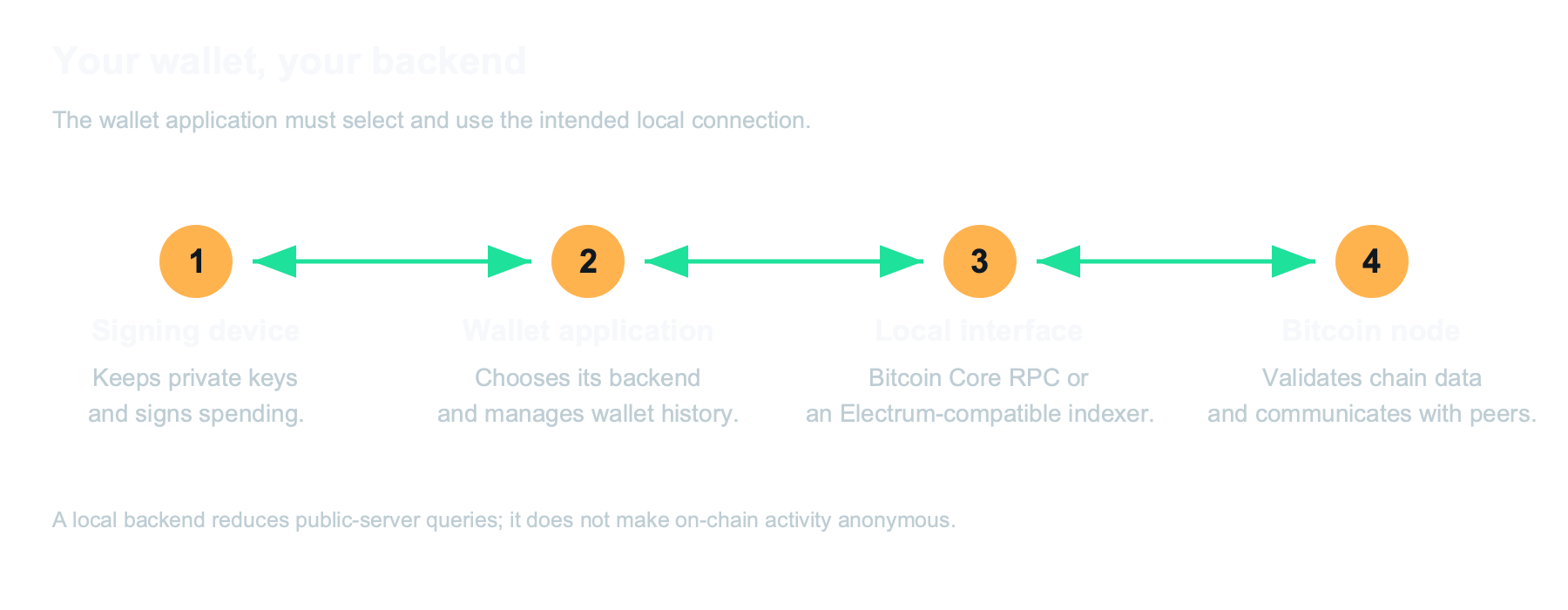
An Electrum-compatible indexer such as Electrs or Fulcrum can provide a private backend for supported wallet applications. Other wallets can connect to Bitcoin Core’s RPC interface directly. The hardware wallet usually stores keys and signs, while companion wallet software handles network queries and broadcasts.
Public transactions remain visible on the blockchain. A local backend does not hide transaction amounts, prevent address reuse, undo information already disclosed, or guarantee that broadcasts cannot be associated with a network source. Tor can help conceal your network address from peers, but it is one part of a privacy setup rather than a complete anonymity guarantee.
Check the supported connection options for your actual wallet. The Sparrow connection guide is an example of how to configure and verify a wallet’s own-node backend. Other applications have their own certificate, proxy, server, and rescan requirements.
3. Add Independent Verification to Self-Custody
Self-custody means controlling the keys needed to spend your Bitcoin; operating a node is a separate choice that adds independent verification. A node can complement a hardware wallet without changing who holds its private keys.
For example, a Blockstream Jade can sign transactions while compatible wallet software uses your own backend for history and broadcasting. The node does not need your recovery phrase to perform validation. Keep seed backups and signing devices separate from routine server administration.
This separation is useful when checking incoming payments and constructing a spend. The wallet manages the relevant addresses and coins, the signing device authorizes the transaction, and the node evaluates chain data. If the server fails, a properly backed-up hardware wallet can still control its funds, although its normal local verification path may be temporarily unavailable.
A server can also run a hot wallet, a Lightning node, or other services with sensitive data. In that case, backups must protect those services, not just the blockchain database. Do not assume that a device called a “Bitcoin node” contains only freely downloadable block files.
4. Check the Supply Rules Yourself
A full node enforces Bitcoin’s permitted coin creation when it validates each block. It checks that the coinbase does not claim more than the allowed subsidy plus transaction fees, along with the other rules governing valid spends.
The subsidy schedule halves at specified block intervals and limits total issuance to approximately 21 million BTC. Transaction fees transfer existing coins to the miner; they do not create an additional subsidy. A block that overclaims the permitted amount is invalid to software enforcing these rules.
An archival and a pruned full node can both enforce the supply rules. Keeping every historical block file is not what gives the node authority; validation establishes the accepted state. A node does not conduct a governance ballot when it receives competing data. The Bitcoin Core overview explains independent rule enforcement and why node operation is not a voting mechanism.
5. Run Lightning and Services on Verified Chain Data
A local node can supply verified chain data to wallet indexers, merchant software, explorers, and a Lightning implementation. Each application has its own backend, storage, indexing, and maintenance requirements, so installing a node client is only the first layer.
Lightning also illustrates why the layers should be distinguished. LND supports full-node backends and Neutrino, while Core Lightning can use a local or remote Bitcoin backend under its documented requirements. A remote Bitcoin backend does not automatically hold the Lightning node’s private keys or channel database; chain-data trust, custody, and channel-state management are different questions.
A local full-node backend gives an operator more control over availability and validation. It also needs enough resources for the selected Lightning configuration. Aggressive pruning, indexer requirements, network outages, and additional applications can affect what works well together. Use the LND backend documentation or Core Lightning setup requirements for the implementation you choose.
| Service | Role | Important requirement |
|---|---|---|
| Bitcoin Core or Bitcoin Knots | Validate the chain and provide node interfaces | Choose and configure one supported implementation; distinguish consensus from local policy. |
| LND or Core Lightning | Operate Lightning channels and payments | Supported chain backend, reliable monitoring, and implementation-specific channel backups. |
| BTCPay Server | Manage merchant invoices and payments | Its documented Bitcoin backend and supporting services; check deployment requirements. |
| Electrs or Fulcrum | Index chain data for compatible wallets | Adequate disk space and supported unpruned/indexing configuration. |
| Mempool | Explore transactions, fees, and blocks | The application’s node, indexing, and database dependencies. |
| Public Pool or another Stratum gateway | Serve jobs to ASIC miners and submit candidates | A correctly configured node interface, reward destination, and compatible mining protocol. |
The service table describes roles, not a promise that every package is available on every management platform or runs simultaneously on the smallest server. Check the current package instructions, supported node version, and required indexes before installing. Keep an eye on CPU load, RAM, storage growth, and the health of dependent services.
6. Participate Independently in the Network
Running and using your own node distributes validation and can add useful relay capacity. It gives you a local decision about which data to accept, not a direct vote that changes the rules for everyone else.
Network resilience benefits from independent operators, locations, and connectivity. A reachable listening node may serve data to additional peers, while a node behind a firewall can still validate for its owner. The contribution depends on configuration and actual use; simply creating extra instances is not equivalent to adding independent economic participants.
Public measurements such as Bitnodes count the nodes they can discover and reach, not every validating machine in existence. Private, intermittent, firewalled, or otherwise undiscovered nodes make a single visible count an incomplete census. A general setup guide should not turn one dated snapshot into a permanent statement about the whole network.
Your software choice and the rules it enforces matter to the transactions you accept. Describing this as a one-node-one-vote governance system is misleading. Bitcoin’s peer structure and data exchange are documented in the P2P networking guide.
7. Gain a Dependable Local Tool and Practical Knowledge
A maintained local backend gives you control over its uptime, updates, configuration, and supported interfaces. It also teaches the difference between keys, wallets, validation, indexing, mining, and payment services through real operation.
Public services can change APIs, restrict requests, or become unavailable. Your own node avoids depending exclusively on those endpoints, but it introduces responsibilities for storage, backups, updates, and troubleshooting. A dedicated server can avoid interruptions caused by using a daily laptop that sleeps or travels; it is not a guarantee against hardware failure or misconfiguration.
Use the system as a practical reference. Check synchronization status, inspect a transaction’s confirmations, compare mempool observations, and learn which service answers each wallet request. These skills help you assess misleading claims about mining rewards, wallet privacy, or blockchain data without treating every dashboard label as proof.
8. Operate a Self-Hosted Solo-Mining Stack
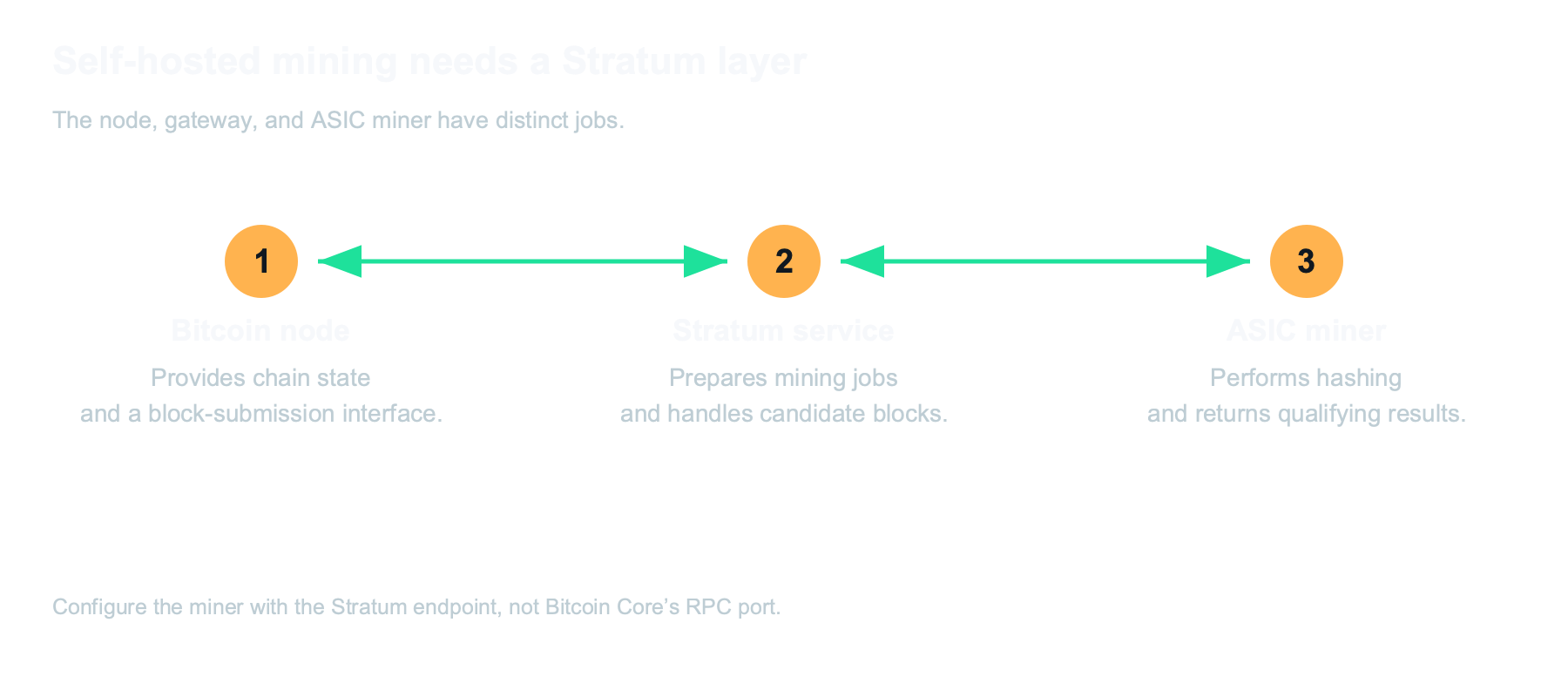
Self-hosted solo mining combines a Bitcoin node with a Stratum service or gateway and compatible mining hardware. The node alone does not expose the mining endpoint that an ASIC expects.
The Bitcoin node supplies chain state and a route for validating and submitting blocks. The Stratum layer prepares work and handles miner communication. The ASIC hashes candidate headers and returns results. Configure the service’s payout destination, network, and node connection, then point the miner at the documented Stratum host and port rather than Bitcoin Core’s RPC port.
A solo miner contributes hashing work under a solo-reward arrangement. Public Pool is one open-source option; it is not the only possible implementation. Third-party solo services are also a form of solo-reward mining, although they operate part of the infrastructure for you. The distinction is who runs the stack and what reward arrangement applies, not whether the word “pool” appears in the software’s name.
Our self-hosted Bitaxe mining guide and solo service comparison explain practical choices. A compatible home miner such as a Bitaxe Gamma or NerdQaxe++ can supply the hashing work, provided the selected gateway and configuration support it.
Running your own stack does not improve the probability of finding a block at unchanged hashrate and difficulty. A valid accepted block carries the subsidy plus its transaction fees, subject to the arrangement you configured and the possibility of competing blocks. Past wins do not make the next result due; use the solo odds calculator with explicit assumptions.
The documented home-miner block records distinguish chain evidence from reports about the hardware. For block 920,440, the customer report described a NerdQaxe++ cluster with Avalon hardware at about 130 TH/s combined. That self-hosted Public Pool account is a historical example, not a forecast or evidence that a lone desktop miner produced the entire setup’s hashrate.
Bitcoin Node Hardware Requirements
Node hardware requirements depend on whether you retain the full archive and which additional services you run. Plan for the operating system, chain state, block files, indexes, application databases, backups, and growth rather than using the raw blockchain size as the entire storage budget.
A pruned full node removes older block files after processing them, while retaining the state needed for validation. Its configured pruning target does not include every file in the data directory. It still needs to obtain and process historical data during a normal initial synchronization, so pruning saves retained disk space rather than making the initial network download disappear. The full-node pruning guidance explains the storage distinction.
An SSD is strongly recommended for a comfortable modern setup because initial synchronization and indexing can be limited by random disk access. It is not a consensus requirement that makes hard-drive-based validation impossible. CPU speed, RAM allocated to caching, storage performance, software settings, bandwidth, and service load all affect completion time.
Node Hardware Requirements Checklist
- Compatible system: Confirm support for the CPU architecture, firmware, network adapter, and storage controller in your chosen node client or management platform. A modern mini PC is convenient, while supported ARM hardware can also work.
- Memory: Treat 8 GB as a practical planning baseline for a modest modern setup, not a universal protocol minimum. More RAM helps caching and additional services; a multi-application server may benefit from 16–32 GB. Follow the selected platform’s documented requirements.
- Storage: A 2 TB SSD is a practical starting point for an archival node with room for selected services, not a requirement for every full node. Indexers and other databases can require substantial additional space. A pruned validation-only setup can use much less storage, subject to application compatibility.
- Bandwidth: Budget for a large initial download and ongoing traffic. Upload use varies with peer connections and serving behavior; check data caps and configured limits instead of assuming one monthly figure applies to every node.
- Power and cooling: Use a suitable power supply, ventilation, and stable power. An always-on server benefits from surge protection and, where practical, a UPS. Continuous uptime matters especially for Lightning monitoring and availability-sensitive services.
- Maintenance and recovery: Leave storage headroom, follow release instructions, and back up service data that cannot simply be downloaded again. Disk redundancy and a second copy of the blockchain are not substitutes for wallet or channel backups.
Raspberry Pi hardware remains a viable option when paired with a supported platform, adequate cooling, a suitable SSD/NVMe arrangement, and reliable power. The RaspiBlitz hardware guide currently recommends a Pi 5 with 8 GB RAM for a new build. That does not mean every operating system supports every Pi model; check the exact image and version before buying parts.
A faster x86 mini PC can make synchronization, indexing, and multi-service use more comfortable. The trade-off includes price, storage expandability, electrical consumption, and platform support. Avoid treating one slow or unreliable build as evidence that all Raspberry Pi nodes are impractical.
Bitcoin Node Software Options
The node client validates Bitcoin, while management platforms package installation, networking, service administration, and updates. Choose the client and platform together, because application compatibility and maintenance behavior can differ.
Bitcoin Node Clients
Bitcoin Core is the widely used reference client, and Bitcoin Knots is a related implementation with additional options and different policy defaults. Both support Bitcoin validation; local relay or mempool policy should not be confused with changing the consensus validity of a block.
For a direct installation, obtain a release through the project’s official distribution instructions and verify the download. Review requirements and release notes before upgrading. Keeping the client on a general-purpose computer can work, but the machine must remain available whenever your wallet or services need its backend.
Node Management Platforms
A management platform adds a browser-based interface and packaged services, but it does not remove the need to understand storage, backups, and update decisions. A polished dashboard is useful administration software, not a separate consensus mechanism.
- StartOS: Start9’s self-hosting operating system manages services, dependencies, interfaces, and backups. It supports suitable hardware and offers Bitcoin and non-Bitcoin packages through its marketplace. Check the installed version’s instructions and the packages available in the selected registry.
- umbrelOS: Umbrel provides a home-server interface and app ecosystem for its hardware and supported DIY installations. Its source is publicly available under the PolyForm Noncommercial license; publicly readable source and unrestricted open-source licensing are not the same thing.
- MyNode: MyNode provides Bitcoin-focused management software with Community and Premium offerings. Feature access, support, and optional subscription services differ, so compare the actual edition rather than assuming every service is included in a free installation.
- RaspiBlitz: RaspiBlitz provides a DIY Bitcoin and Lightning stack with documented hardware and setup choices. It suits owners who want to learn and administer the system, while still offering interfaces that reduce the need to manage every task by hand.
Do not assume that “one-click updates” means updates install automatically. For example, Umbrel’s update instructions explicitly describe owner-initiated installation. Read the release notes, compatibility requirements, and backup guidance for whichever platform and services you use.
Bitcoin Node Hardware and Price Comparison
Compare the complete configuration, included storage, software, and support rather than only the device’s starting price. The examples below were checked on November 9, 2026, and are manufacturer or live-listing information rather than comparative benchmark results.
A CPU’s nominal TDP is not the entire server’s wall-power consumption. Likewise, a maximum storage capacity can require additional drives, and RAID protection requires a suitable configuration. Taxes, regional shipping, optional support, and included storage can change the delivered comparison.
| Hardware | CPU / memory | Storage | Price snapshot | Notes |
|---|---|---|---|---|
| Start9 Server One, current 6600H configuration | Ryzen 5 6600H; 16 or 32 GB LPDDR5 | 2 TB or 4 TB NVMe | $899–$1,399 at Solo Satoshi | StartOS preinstalled; Gigabit Ethernet; check the selected configuration. |
| Umbrel Home | Intel N150; 16 GB LPDDR5 | 512 GB, 1 TB, 2 TB, or 4 TB | $499 / $599 / $699 / $949 listed by storage | 512 GB option was unavailable in the checked configurator; smaller storage may require pruning. |
| Umbrel Pro | Intel Core i3-N300; 16 GB LPDDR5 | Four NVMe slots; up to 32 TB | $699 bare; $999 with 2 TB; $1,299 with 4 TB; $1,899 with 8 TB | 2.5 GbE; optional multi-drive protection does not replace backups. |
| MyNode Model Two | Intel N100; 16 GB RAM | 2 TB NVMe | $549 advertised sale price | Premium software and included support are specified in the listing. |
| Nodl One Mark 2 | Rockpi4 / RK3399 platform | Listed 2 TB SSD | €599 without optional setup support | €200 setup-support option; listing prices exclude tax. |
| DIY hardware | Compatible mini PC, laptop, or supported single-board computer | Choose for archive/pruning and applications | Depends on the complete parts list | Existing equipment can reduce cost; installation and support depend on the chosen platform. |
The current Solo Satoshi Server One listing confirms its 6600H configurations and included terms. Other product details come from Umbrel Home, Umbrel Pro, MyNode Model Two, and Nodl One. Recheck the selected configuration before purchase; a dated comparison is not a perpetual price guarantee.
Wired Ethernet is a straightforward choice for a stationary node with a large initial download. If you plan to use Wi-Fi, verify that the selected hardware and installed platform support it.
DIY vs Plug-and-Play
DIY gives you control over the parts and installation, while plug-and-play hardware reduces the assembly and initial software-installation work. Both approaches still need synchronization, suitable configuration, updates, and recovery planning.
A DIY build can reuse a laptop, mini PC, or supported single-board computer and storage. Its value depends on what you already own and what you need to add. Include the supply, case, cooling, drive adapter, boot media, and time spent configuring it rather than comparing only a bare computer’s price with a complete server.
A preinstalled server provides a more direct starting point and a defined support channel. It can be a good fit when you prefer administering services through a browser over assembling the underlying system. Initial account creation may take minutes, but validating historical chain data and building indexes is a separate process that can take much longer.
Neither category guarantees reliability. Good components, stable power, backups, sensible updates, and monitoring matter in both. Choose a platform you can maintain or obtain help with, and avoid a plan that depends on undocumented configuration you cannot reproduce.
Which Bitcoin Node Should You Buy?
Choose the hardware for your planned services, storage mode, support needs, and budget. A modest validation-only setup has different requirements from an archival server running wallet indexes, Lightning, an explorer, merchant software, and general home-server applications.
For a supported preinstalled StartOS system, the current Server One offers a Ryzen 5 6600H, 16 or 32 GB of LPDDR5 memory, and 2 or 4 TB of NVMe storage. Its suitability depends on the selected services and workload. Memory is part of the chosen configuration, so do not assume soldered LPDDR5 can later be upgraded like replaceable desktop DIMMs.
A lower-priced server or an existing computer can still be a good validation platform. Smaller storage can work with pruning, provided your wallet workflow and required services support it. If you need an Electrum indexer or other archive-dependent application, size the drive for that application rather than assuming the pruned node’s smaller block budget is enough.
Start9 Server One: Current and Historical Configurations
The current 6600H Server One is different from the earlier 2026 6800H configuration and the older 5825U generation. Compare named models and sale periods instead of treating every previous Server One as a single “old model.”
| Configuration | Manufacturer’s sale period | CPU / memory |
|---|---|---|
| Current 6600H | September 2026 onward | Ryzen 5 6600H; LPDDR5-6400 |
| Earlier 2026 configuration | December 2025–August 2026 | Ryzen 7 6800H; LPDDR5-6400 |
| 2024 configuration | January 2024–December 2025 | Ryzen 7 5825U; DDR4-3200 |
The Start9 hardware history documents these differences. Current Solo Satoshi purchases list a one-year limited hardware warranty and their stated support terms. Historical purchases follow the terms supplied with that purchase; a new listing should not be applied retroactively to an older order.
How to Set Up a Bitcoin Node
Set up the hardware and software, let the node synchronize, then connect and verify the applications that will use it. A reachable dashboard is only the administration milestone; it does not establish that the chain, indexes, or wallet history are ready.
Plug-and-Play Setup with StartOS
A preinstalled StartOS server still needs initial setup, a trusted local connection, and the chosen node service. Follow the instructions for the installed release, because setup screens, addresses, and service packaging change.
- Connect Ethernet and the correct power supply, using appropriate surge protection. Keep the server on a trusted local network during setup.
- Open the documented initial address. Current StartOS setup instructions use
http://start.localfor the initial flow, followed by the server’s permanent local address. Older releases can differ. - Select the appropriate new-server or recovery option, choose a server name where prompted, and set a strong master password. Keep recovery information in a safe place.
- Follow the platform’s instructions to trust your own server’s Root CA on the client devices that need it. Confirm that you are connecting to the intended server; installing a root certificate changes what that client trusts.
- Install a supported Bitcoin client from the marketplace and review its package instructions, dependencies, storage mode, and required configuration. Start the service and monitor initial synchronization.
- Wait for the node to finish initial synchronization. If you add an indexer, wait for its separate indexing process as well; the node and indexer are different readiness checks.
- Configure the wallet, explorer, Lightning implementation, or other service to use the intended backend. Use each package’s connection instructions and check its health status.
- Test the relevant workflow, establish backups, and record the installed versions and recovery procedure before depending on the server for ongoing services.
What the Security Certificate Protects
A trusted local HTTPS connection protects the browser-to-server connection it covers. It does not automatically encrypt every Bitcoin peer connection, every RPC interface, or every application’s independent transport.
StartOS supports a server-generated local certificate authority. Current Umbrel also provides local HTTPS and certificate instructions, and other platforms have their own security features. The Umbrel HTTPS guide makes clear that local certificates are not exclusive to StartOS.
For wallet connections, the supported interface can have its own TLS and certificate requirements. Start9’s wallet connection documentation explains the different trust mechanisms used by compatible wallets. Keep browser security, wallet transport, and node RPC access distinct when troubleshooting.
DIY Setup on Supported Hardware
A DIY installation requires a compatible operating system, a verified software image or binary, and deliberate storage and network configuration. Choose the software path before buying adapters and drives, especially for single-board computers.
- Check the platform’s supported hardware and download the correct release. Verify the published checksum and, where provided, its signature using the project’s instructions.
- Install the system to the intended drive. Confirm the target carefully before flashing or repartitioning; an installer can erase existing data.
- Configure the Bitcoin client’s data location, pruning or archival mode, and indexes required by planned applications. Avoid enabling incompatible options merely by copying someone else’s configuration.
- Start synchronization and monitor storage, temperature, logs, and progress. Check data caps and power settings so a personal computer does not unexpectedly sleep during the process.
- Configure applications to use the node over the documented local or protected interface. Keep administrator and RPC access restricted.
- Verify readiness and backups using the checks below, then maintain the installation according to its release and package instructions.
Bitcoin Core’s RPC interface is powerful and should not be exposed directly to the public internet. Authentication is not the same as transport encryption or a hardened public API. Follow the Bitcoin Core RPC security guidance and the platform’s supported remote-access method.
Confirm That Setup Is Complete
Setup is complete when the node is synchronized and the intended wallet or service demonstrably uses the correct backend. Check each layer rather than relying only on an IP address, a green dashboard, or a running fan.
- Node status: Confirm the intended network and a healthy synchronization state. In Bitcoin Core,
bitcoin-cli getblockchaininfoexposes fields such aschain,blocks,headers,initialblockdownload, andverificationprogress. Interpret them together. - Indexes and dependencies: Confirm the indexer has finished and any required databases or dependent services are healthy. A synchronized Bitcoin client does not make an unfinished wallet index ready.
- Wallet connection: Check the configured server address and connection status in the wallet. Confirm a known receiving address or transaction history, and review any public-server fallback behavior.
- Backups: Verify that wallet keys, service configuration, and Lightning recovery material are protected using the application’s own procedure. Check that you know how to restore them.
- Access and maintenance: Confirm that administrative interfaces are not publicly exposed, updates are understood, and enough disk space remains for the planned workload.
How a Bitcoin Node Fits Into a Complete Setup
A node is a shared verification backend for the applications you choose to connect to it. The rest of the setup depends on whether you want wallet queries, merchant payments, Lightning, mining, or development tools.
- Self-custody holders: Keep signing keys on a suitable device or protected wallet and connect compatible wallet software to your backend. Our Bitcoin wallet range covers signing and custody hardware; a node is an additional verification choice.
- Lightning operators: Configure a supported backend and plan liquidity, monitoring, updates, and recovery. Running your own chain backend does not remove channel-management responsibilities.
- Merchants: Use the documented node and indexer dependencies for your payment software. Verify invoice and payment behavior before relying on it for customer transactions.
- Solo miners: Supply compatible Bitcoin mining hardware and a working Stratum layer. Confirm accepted work and the configured reward destination, not just a connection indicator.
- Developers: Use a protected local RPC interface and choose the appropriate network for testing. A local backend can avoid public API limits, but application permissions and data access still need deliberate configuration.
Your Bitcoin Node as a Home Server
The same physical server can run a Bitcoin node and other self-hosted applications when its resources and software support them. Extra applications share CPU, RAM, storage, power, and maintenance responsibilities with the node.
StartOS and umbrelOS both package non-Bitcoin applications alongside Bitcoin services. File storage, password management, media, and home automation are examples, with availability and requirements depending on the current registry and package version. AI workloads can be much more demanding than basic validation, so a marketplace entry is not proof that every model can run a large workload comfortably.
Compare the Actual Platform Features
Compare supported hardware, app availability, licensing, networking, backups, update behavior, and support for your intended workload. General claims that one platform is universally more secure or uniquely offers local encryption need evidence and should not replace a feature-by-feature assessment.
StartOS offers dependency and interface management as part of its service model. Umbrel provides its own app ecosystem, local HTTPS, storage features, and administration tools. Either still needs the owner to configure access appropriately, maintain the software, and understand how each application handles data.
Our home-server guide explores broader self-hosting uses. You can also compare home-server hardware if the workload extends well beyond Bitcoin. Preserve the node’s resource headroom rather than filling the machine with applications simply because they can be installed.
Maintenance, Backups, and Downtime
A node needs ongoing updates, storage monitoring, and backups for any data that cannot be downloaded again. The blockchain archive is replaceable; wallet keys, service configuration, and Lightning recovery material may not be.
An ordinary validation node can go offline and catch up when it returns. That does not make Bitcoin controlled by a separately backed-up hardware wallet disappear. Your local wallet backend is unavailable during the outage, however, and its privacy or availability behavior depends on how the wallet handles fallback connections.
Active Lightning channels introduce time-sensitive monitoring and recovery requirements. Keep the Lightning implementation’s documented channel backups and seed material, understand any watchtower arrangement, and follow its restore procedure. Do not assume that a generic disk backup or an arbitrary copy of a live channel database is a safe universal recovery plan.
RAID or a platform’s drive-failure protection can improve resilience in its supported configuration. It does not protect against every form of deletion, theft, corruption, software error, or disaster, and it is not a substitute for an independent backup. Test the recovery process for the services that matter to you.
Before major updates, review release notes and migration instructions and confirm the backup is usable. Keep an eye on free storage, service health, and alerts. If synchronization stalls, investigate logs, hardware health, network access, and data location before deleting databases or repeatedly reinstalling the server.
Start Building Your Bitcoin Node Setup
Start with a clear goal: independent wallet verification, a service stack, or a broader home server. Choose a supported configuration that fits that goal and leaves room for the storage and maintenance it requires.
Browse Bitcoin node hardware for complete configurations, then check the specific listing’s included software, storage, warranty, and support. Solo Satoshi supplies node hardware, signing devices, and miners from Conroe, Texas; current shipping and product terms are shown on the relevant listings.
A well-configured modest node can provide useful independent verification. A more capable dedicated server can make multiple services easier to manage. The right result is a system you understand, keep updated, and actually connect to your wallet or applications, rather than a device that merely sits on the network.