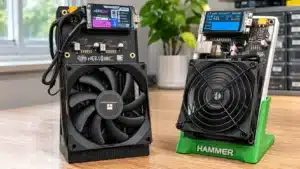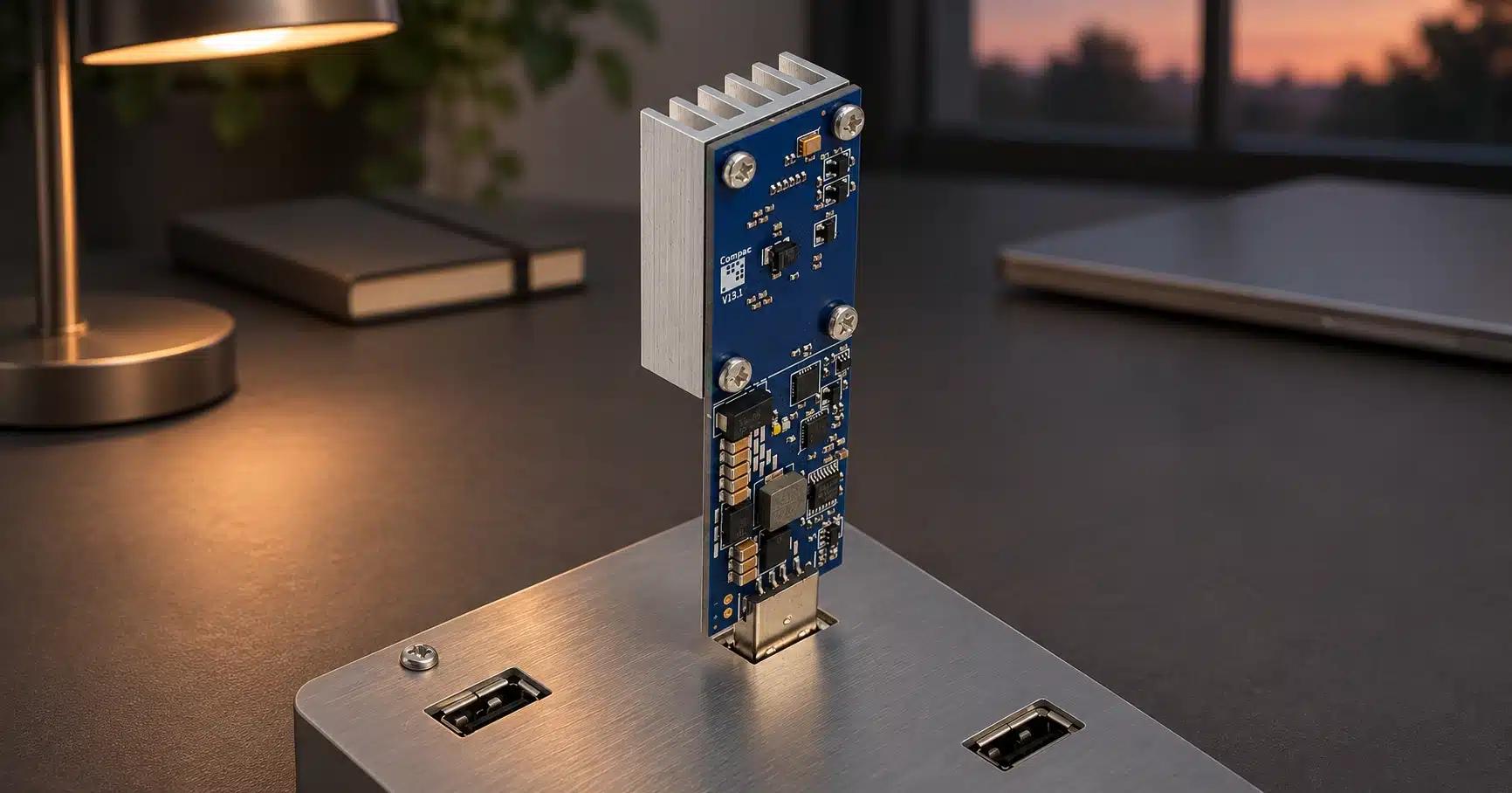
Hero illustration based on genuine Compac A2 product photography. An operating A2 also requires its cooling fan, which is not pictured.
A USB Bitcoin miner can perform real mining, but the USB connector tells you very little about its performance or value. Some devices use an ESP32 microcontroller for educational hashing. Others contain a dedicated SHA-256 ASIC. Some need a computer running mining software, while others use USB only for power and connect to a pool over Wi-Fi.
For most first-time buyers who want a straightforward home ASIC, the Bitaxe Gamma 602 is the stronger value in this comparison: about 1.2 TH/s from $61 for the device, or $67 with the listed North American power supply. That is twice the stock hashrate of the Compac A2 V2 and about four times a single Disruptor’s 300 GH/s baseline. The USB alternatives still have uses, especially if you already own a suitable hub and host computer.
Solo Satoshi sells the Bitaxe, NerdQaxe++, and Avalon alternatives discussed here. Product specifications are published ratings unless explicitly identified as our testing. Prices are USD, before tax and shipping.
Quick overview
- Two different device types: USB ASIC sticks perform dedicated SHA-256 work, while ESP32 NerdMiners are much slower educational projects. A USB memory drive cannot become a mining ASIC by installing software.
- Count the whole setup: A computer-controlled stick needs compatible software, a host that stays on, suitable cooling, and enough USB power. For Compac A2 V2, include the required powered hub and controller in both cost and electricity estimates.
- Our first-purchase recommendation: For a straightforward new home setup, the Gamma 602 package compares favorably at about 1.2 TH/s from $67 with the listed North American supply. A USB ASIC stick can still suit an existing hub-based rig or a hands-on learning project.
- Block-finding expectations: At the guide’s fixed 148.365T difficulty snapshot, 300 GH/s has a calculated annual block probability of roughly 1 in 67,308. Difficulty and uptime change the result; the statistical mean is not a promised waiting period.
- Win claims need evidence: The USB-miner block-win claims discussed here could not be independently verified. A real block on an explorer does not identify its mining hardware; reliable operator records and hardware attribution are also needed.
- Buying criteria: Compare the exact ASIC, sustained published hashrate, complete package, firmware support, pool difficulty requirements, and measured wall power. Genuine hashing does not make a device a dependable income purchase.
What Is a USB Bitcoin Miner?
A USB Bitcoin miner is a compact device that uses a USB connection for power, communication with a host computer, or both, and hashes Bitcoin block headers as part of SHA-256 proof of work. A true USB ASIC stick contains a chip built specifically for mining. An ESP32-based NerdMiner instead performs hashing on a general-purpose microcontroller.
The miner usually receives work from a mining pool through the Stratum protocol. A computer-controlled stick needs software such as CGMiner to manage that connection. A Wi-Fi device can run its own firmware and use USB just to obtain power. These are different setups, even when both are advertised as USB miners.
A USB miner does not store your Bitcoin, and it does not produce Bitcoin simply because it is plugged in. It searches for a valid block. Under solo mining, there is no mining payout unless your setup finds a block accepted by the network. Under conventional pooled mining, the pool applies its own reward and minimum-payout rules. Our explanation of what a Bitcoin miner does covers the work behind the dashboard.
What Types of USB Bitcoin Miners Exist?
1. ESP32 NerdMiner and similar educational devices
These devices use a Wi-Fi microcontroller rather than a mining ASIC. NerdMiner is an open-source firmware project with support for multiple ESP32 boards. Model, board, firmware, and settings affect the actual rate, so labels such as NerdMiner, NMMiner, or Lucky Miner do not establish a single hashrate. Some products bearing similar names are ASIC-based, so check the chip rather than the branding alone.
The 78 KH/s and 1 MH/s examples used below illustrate the microcontroller performance class; they are not universal ratings. At this scale, the device is useful for seeing hashing, shares, and pool communication in action. It is a poor choice if your main objective is maximizing the chance of finding a block.
2. GekkoScience and other computer-controlled ASIC sticks
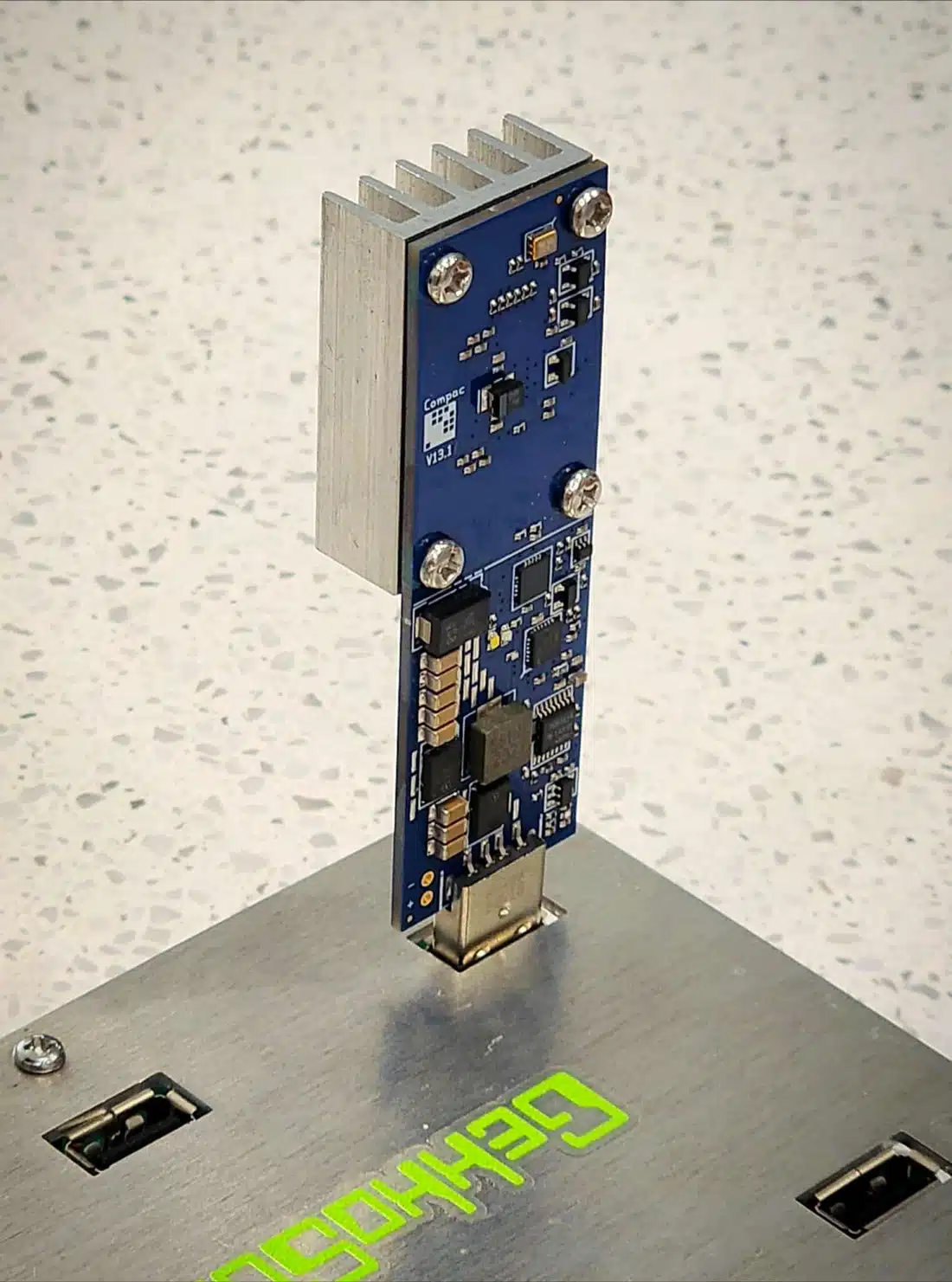
A GekkoScience Compac A2 V2 is a true ASIC stick. Its manufacturer specification lists 600 GH/s at stock settings and over 1 TH/s as a possible overclock, depending on hub power. The listed package is $80 and includes an Icepac fan; the powered hub and controller running CGMiner are additional requirements. Overclocking is a capability, not a guaranteed rate for every setup.
The CGMiner Gekko driver identifies the A2 as a single-BM1370 device. Chip count is not a substitute for measured hashrate, and using a BM1370 does not make every product perform identically.
Legacy sticks: Block Erupter, Compac F, and Compac A1
The ASICMINER Block Erupter USB Sapphire is historical hardware. Its original May 2013 announcement reports approximately 336 MH/s. At 0.000336 TH/s, it is many orders of magnitude below a current home ASIC. A collector may value its history, but a high resale price does not improve its mining capability.
Compac F uses the BM1397, and Compac A1 uses BM1362 hardware. They remain relevant to owners of existing USB rigs, but their performance, cooling, and software requirements must be checked for the specific revision. A historical MSRP, an old reseller listing, and a current complete package are not interchangeable prices. We therefore do not present the old $249 to $319 reseller range as today’s standard cost or call A1 the most powerful current USB stick.
3. Disruptor and other Wi-Fi miners with USB power
The Disruptor is a different design: it uses a BM1366 ASIC and connects through Wi-Fi with AxeOS-based firmware, so it does not need a PC to pass work over USB. Its current product listing advertises 300 GH/s+ and a single-unit price of $79.99. Listed bundles are $319.99 for four, $479.99 for six, and $959.99 for twelve.
Its source page currently gives inconsistent power figures: 8 W in one section and 15 W in another. We show both as estimates rather than treating one as a verified wall measurement. Confirm the correct power source and operating requirement for the actual unit; a USB-shaped connector does not prove that a laptop port can safely power it.
What Are the Real Odds of a USB Miner Finding a Block?
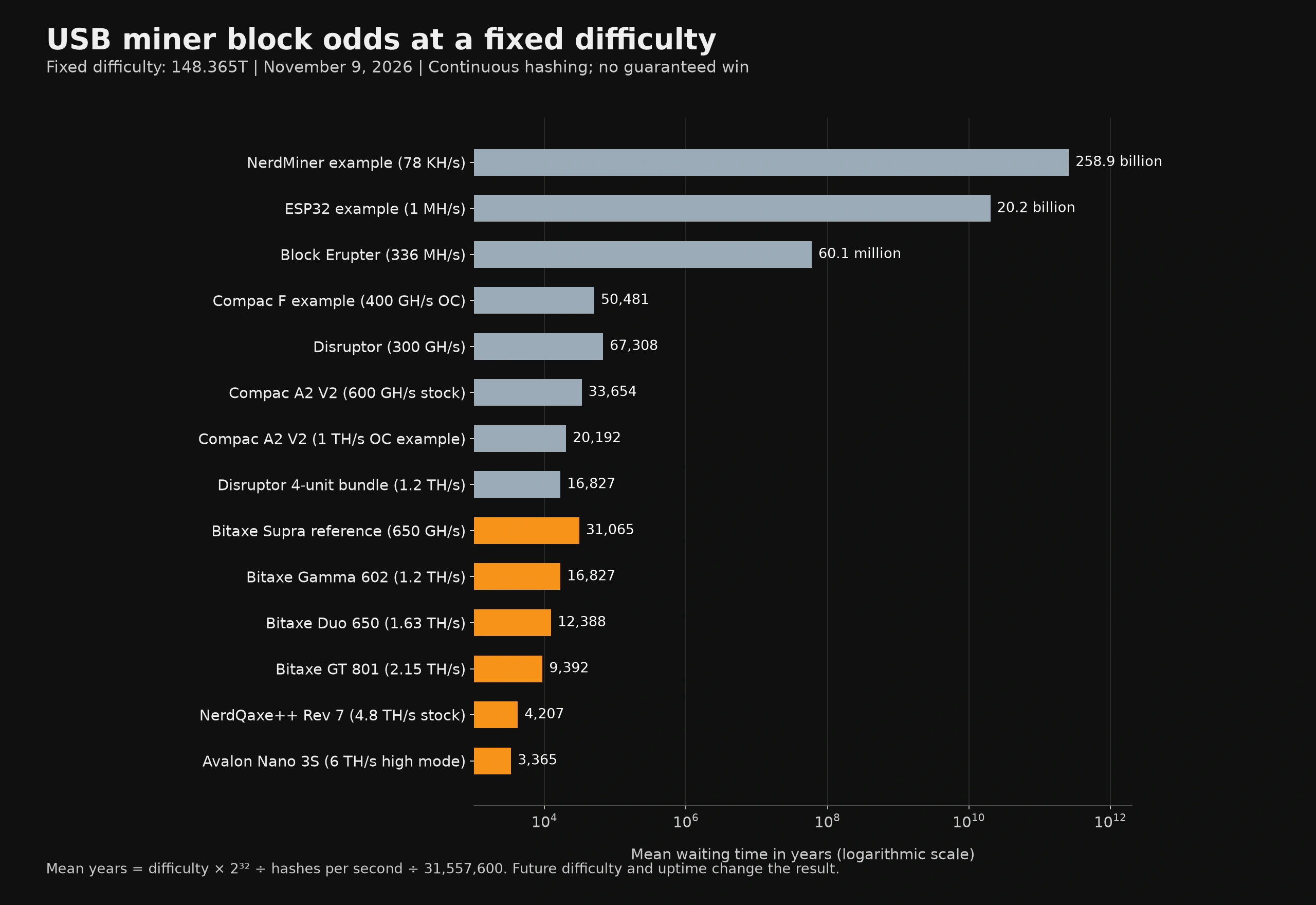
At the USB-miner hashrates and fixed difficulty shown below, a year of solo mining is overwhelmingly likely to produce no reward. The very long mean waiting times reflect those small probabilities.
How to read this: the mean is not a schedule. A miner can find a block immediately, or run for many mean waiting periods without one.
The calculation below uses a dated mempool.space difficulty snapshot of 148.365 trillion, checked November 9, 2026. All rows use that same difficulty and continuous hashing. Future difficulty, downtime, stale work, and rejected work can change the result.
First, keep the units consistent: 78 KH/s = 0.000000078 TH/s, 1 MH/s = 0.000001 TH/s, and 336 MH/s = 0.000336 TH/s. Hashrate must be expressed in hashes per second when applying the formula.
Scroll sideways to compare all columns. Keyboard users can focus the table region and use the arrow keys.
| Device or example | Hashrate | Mean time per block | Chance of at least one block in one year |
|---|---|---|---|
| NerdMiner example (78 KH/s) | 0.000000078 TH/s | 258.9 billion years | About 1 in 258,875,807,964 |
| ESP32 example (1 MH/s) | 0.000001 TH/s | 20.2 billion years | About 1 in 20,192,313,022 |
| Block Erupter (336 MH/s) | 0.000336 TH/s | 60.1 million years | About 1 in 60,096,170 |
| Compac F example (400 GH/s OC) | 0.4 TH/s | 50,481 years | About 1 in 50,481 |
| Disruptor (300 GH/s) | 0.3 TH/s | 67,308 years | About 1 in 67,308 |
| Compac A2 V2 (600 GH/s stock) | 0.6 TH/s | 33,654 years | About 1 in 33,654 |
| Compac A2 V2 (1 TH/s OC example) | 1 TH/s | 20,192 years | About 1 in 20,193 |
| Disruptor 4-unit bundle (1.2 TH/s) | 1.2 TH/s | 16,827 years | About 1 in 16,827 |
| Bitaxe Supra reference (650 GH/s) | 0.65 TH/s | 31,065 years | About 1 in 31,066 |
| Bitaxe Gamma 602 (1.2 TH/s) | 1.2 TH/s | 16,827 years | About 1 in 16,827 |
| Bitaxe Duo 650 (1.63 TH/s) | 1.63 TH/s | 12,388 years | About 1 in 12,388 |
| Bitaxe GT 801 (2.15 TH/s) | 2.15 TH/s | 9,392 years | About 1 in 9,392 |
| NerdQaxe++ Rev 7 (4.8 TH/s stock) | 4.8 TH/s | 4,207 years | About 1 in 4,207 |
| Avalon Nano 3S (6 TH/s high mode) | 6 TH/s | 3,365 years | About 1 in 3,366 |
Formula: mean seconds ≈ difficulty × 232 ÷ hashrate in H/s. Mean years = mean seconds ÷ 31,557,600. The probability of at least one block in time t is 1 − exp(−hashrate × t ÷ (difficulty × 232)). This is the standard large-difficulty approximation under fixed conditions. It follows Bitcoin’s proof-of-work target model.
Equal hashrate gives equal theoretical odds under the same conditions. A four-unit Disruptor bundle rated at 1.2 TH/s and one Gamma rated at 1.2 TH/s therefore have the same modelled probability. Open-source firmware, a different enclosure, or a past block win does not add a luck multiplier. Use the solo-mining odds calculator for a different rate or difficulty.
Has a USB Miner Ever Found a Bitcoin Block?
We could not verify the USB-miner wins discussed here. The NerdMiner and Compac F stories lack sufficient evidence to confirm the named hardware. Bitaxe ASIC wins are better documented: for block 887,212, the Solo CKPool operator published a log identifying the winning Bitaxe Ultra worker. That does not confirm a win by a USB stick or an ESP32 NerdMiner.
A valid Bitcoin block currently carries a 3.125 BTC subsidy plus its transaction fees. A solo mining service may deduct its fee, so the miner’s payout can differ from the full block reward. Its dollar value changes with Bitcoin’s price.
Separate three things: a block existing on the chain, an operator identifying the winning worker, and evidence of that worker’s hardware. A block explorer can establish the block, timestamp, transactions, and coinbase outputs. It generally cannot establish whether the winning hash came from a USB stick, a Bitaxe, or another ASIC. That needs operator records or credible first-hand documentation.
The NerdMiner story naming block 836,569 remains a hardware-attribution claim that we cannot substantiate here. The block exists, but that alone does not verify an ESP32 found it. Retailer stories about Compac F wins also need a specific block and reliable hardware attribution before we present them as confirmed. An old reward amount alone is not enough to identify the equipment or date.
- Block 887,212, March 10, 2025: the Solo CKPool operator’s published log identifies a Bitaxe Ultra worker at roughly 480 GH/s within an account hashing at about 3.3 TH/s. This was a CKPool find.
- Block 913,272, September 5, 2025: our NerdQaxe++ coverage describes a find while using Ocean. Conventional pool participation does not entitle that worker to the whole block reward.
- Block 920,440, October 23, 2025: Solo Satoshi received a customer report involving a NerdQaxe++ cluster and an Avalon miner on self-hosted Public Pool. The reported combined setup was approximately 130 TH/s, not a lone 6 TH/s miner. The block timestamp can be checked independently; the device attribution and customer story are reported evidence.
- Block 924,569, November 21, 2025: our coverage attributes the CKPool worker setup to Bitaxe Gamma hardware. Worker statistics and the customer’s hardware evidence should be read alongside the chain record, rather than described as device identification from the blockchain alone.
Our Bitaxe and NerdQaxe++ block-find coverage provides further context. These examples show that home ASICs can produce valid blocks. They do not establish a minimum winning hashrate, prove a new buyer is due a win, or make a handful of shorter intervals a reliable prediction.
What Does a USB Mining Setup Actually Cost?
Compare the whole setup you need, not a USB stick’s price against a fully equipped alternative. A host computer you already own can make a USB setup more attractive, but it still has to stay on and consumes electricity. A new host, hub power supply, fan, and delivery can change the decision. Manufacturer and Solo Satoshi listing prices below were checked November 9, 2026.
Scroll sideways to compare all columns. Keyboard users can focus the table region and use the arrow keys.
| Requirement | ESP32 example | Compac A2 V2 | Disruptor | Bitaxe Gamma 602 |
|---|---|---|---|---|
| Device price | Varies by board and seller | $80 | $79.99 | From $61 |
| How it connects | Wi-Fi firmware | USB data to a controller running CGMiner | Wi-Fi firmware | Wi-Fi through AxeOS |
| Power and cooling | Supply rated for the board | Suitable powered hub and its supply; included Icepac fan | Rated USB supply; built-in cooling | Compatible 5 V supply; fitted heatsink and fan |
| Computer required while mining? | No separate host | Yes: PC, Pi, or another supported controller | No separate host | No separate host |
| Useful setup-price example | Check the exact board, enclosure, and supply | $120 if the hub costs $40 and a suitable host is already owned. This is an allowance, not a quoted complete kit. | $79.99 plus any required power accessories | $67 with the listed North American supply; from $68 for EU/UK/AU supply |
| Stock hashrate used here | 78 KH/s and 1 MH/s examples | 600 GH/s | 300 GH/s baseline | About 1.2 TH/s |
| Warranty comparison | Seller terms vary | Check manufacturer terms | Source page shows 90-day and separate conditional guarantee language; confirm purchase terms | Six-month limited Solo Satoshi warranty |
The current Gamma comparison: its $67 power-supply package is $12.99 below the $79.99 single Disruptor device price, while its published rate is about four times the Disruptor’s 300 GH/s baseline. The four-Disruptor bundle is $319.99 for a combined 1.2 TH/s, versus $67 for the Gamma package: a $252.99 listed-price difference. Disruptor accessories, tax, and shipping are not assumed to be included.
Against the Compac A2 V2, the Gamma package costs $13 less than the $80 stick package alone and supplies twice the published stock hashrate. If you add the example $40 hub allowance to the A2 and already own its host, the comparison becomes $120 versus $67, a $53 difference. Actual hub and host choices can change that total. This is a clearer reason to consider Bitaxe than inflated legacy-reseller comparisons.
Electricity and host-computer costs
At $0.16/kWh, running continuously for 30 days costs watts ÷ 1,000 × 24 × 30 × $0.16. A 1 W educational device costs about $0.12 per month, using this electricity-rate assumption. Measure the full setup at the wall if you need an accurate running cost.
Scroll sideways to compare all columns. Keyboard users can focus the table region and use the arrow keys.
| Power assumption | 30-day cost | What the figure does and does not include |
|---|---|---|
| 1 W ESP32 example | $0.12 | Illustrative board consumption; verify the actual device. |
| 8 W Disruptor claim | $0.92 | One figure on the manufacturer page; not a measured result. |
| 15 W Disruptor claim | $1.73 | A second, conflicting figure on the same page. |
| 18 to 20 W Gamma example | $2.07 to $2.30 | Published device range; supply losses can affect the wall reading. |
| USB ASIC stick plus hub and host | Measure the complete system | Do not omit the always-on computer, hub, supply losses, or external fan. |
Small running costs do not make solo mining a predictable income source. Under conventional pooled mining, fees, minimum accepted share difficulty, payout thresholds, and hashrate determine whether tiny balances can actually be paid. Our mining profitability calculator helps compare assumptions without treating an occasional jackpot as an expected household income.
What Hardware and Software Do USB Miners Need?
Computer-controlled USB ASIC sticks
- Choose the power system first. Confirm per-port current, the hub’s combined power budget, its supply rating, cable quality, and the exact stick’s requirements. A general-purpose hub or laptop port is not automatically suitable.
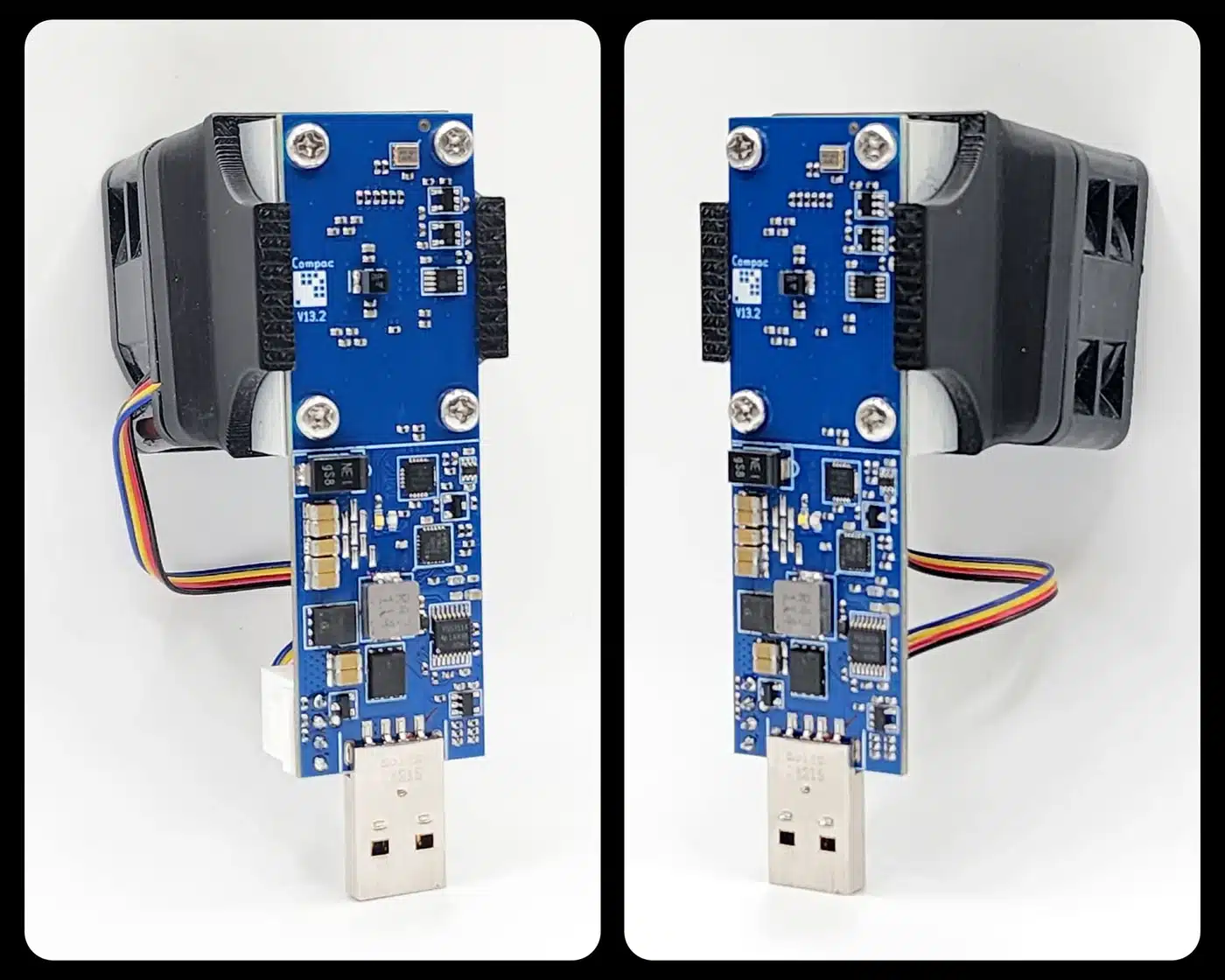
- Fit the specified cooling. Provide airflow around the heatsink, use the required fan, and monitor temperature. The Compac A2 V2 package includes a fan; the bare-stick product photo does not show a complete cooled operating setup.
- Use compatible software. Install a trusted CGMiner build with support for your stick and operating system. Follow the maintained CGMiner documentation for USB drivers, permissions, and build requirements. Linux is one option; command-line mining is not inherently Linux-only.
- Configure the pool and payout identity. Use the service’s exact Stratum endpoint, worker format, and Bitcoin payout address. Choose solo or shared rewards deliberately, and check the pool’s share-difficulty requirements.
- Start at documented settings. Check accepted shares, sustained hashrate, cooling, and uptime before changing clocks or voltage. Overclocking can increase power draw, heat, and errors.
GekkoScience currently flags an A2 temperature-sensor driver issue and provides a patched driver through its product page. Check the manufacturer’s current instructions rather than following a static copied command from an old guide. Do not expose a miner-management API to the public internet just to view statistics.
ESP32 and Wi-Fi USB-powered miners
A preflashed NerdMiner or Disruptor generally needs power, Wi-Fi credentials, a compatible pool, and a Bitcoin address. Firmware flashing is a separate step when the board is not already configured. A normal USB flash drive with no mining processor cannot be turned into an ASIC by installing a mining application.
NerdMiner’s documentation warns that very low share difficulty can prevent a miner appearing correctly on standard pools. Follow the current project’s pool guidance instead of assuming that every Bitcoin pool accepts microcontroller miners. For any device, accepted shares and best difficulty help you understand whether it is doing useful work, but a low-difficulty share is not a Bitcoin block.
A Bitaxe uses its own Wi-Fi controller and web dashboard, so the browser can be closed after configuration. Our Bitaxe setup guide covers getting connected, and the AxeOS guide explains the dashboard in detail.
How Does Difficulty Affect USB Miner Odds?
Bitcoin’s network difficulty adjusts every 2,016 blocks, which is approximately two weeks at the target block interval. It can rise or fall. If difficulty rises by 10% and hashrate stays constant, the mean time per block also rises by 10%. If difficulty falls, the same device’s probability improves.
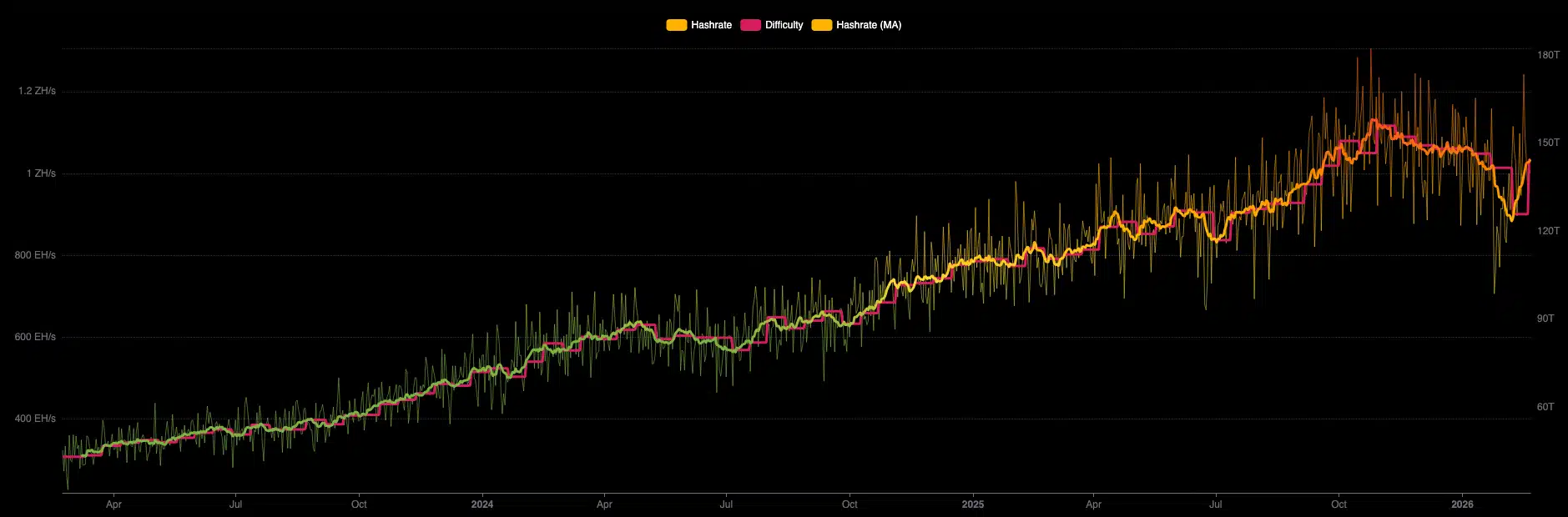
Network hashrate is an estimate inferred from observed blocks and difficulty, not a live meter of every ASIC. Short-window estimates fluctuate. The historical chart below illustrates the scale of growth, while the calculation table uses the single, clearly dated difficulty snapshot above.
There is no special hashrate threshold below which a valid block becomes mathematically impossible. A working 78 KH/s device has a nonzero probability, but that probability is far smaller than a terahash-class ASIC’s. For the same operating time and difficulty, multiplying valid hashrate roughly multiplies a very small chance by the same factor. It does not make the outcome reliable.
Where Do USB Miners Make Sense?
An educational ESP32 project can make the mechanics tangible: hashrate, Stratum messages, difficulty, shares, and payout configuration. That is a useful reason to own one. It is different from buying hardware with a realistic expectation of mining income.
A real USB ASIC stick can also suit someone who already owns a compatible powered hub, likes wired USB control, and wants to learn CGMiner or compare settings. Historical Block Erupters have a separate collecting appeal. These uses do not require us to describe poor hashrate-per-dollar offers as competitive purchases for a first-time home miner.
Be cautious with the listing, rather than assuming an entire form factor is either a scam or safe. Check the actual processor, stock rate, power requirement, included accessories, firmware source, and returns policy. A real hashing device can still be overpriced, misdescribed, or paired with unsuitable accessories. A seller’s guaranteed-income claim is not evidence that the hardware can recover its cost.
USB Miners vs. Standalone Bitaxe and Home ASIC Alternatives
The Bitaxe platform combines a mining ASIC, an onboard controller, Wi-Fi, and a browser interface. The key advantage for many buyers is a simpler complete setup with more hashrate for the money. The distinction is architecture and total cost, not a claim that USB ASICs are somehow not real ASICs.
Scroll sideways to compare all columns. Keyboard users can focus the table region and use the arrow keys.
| Model | Stock hashrate and power | Device from | With listed power supply from | Why consider it |
|---|---|---|---|---|
| Bitaxe Gamma 602 | 1.2 TH/s 18 to 20 W |
$61 | $67 | Lowest listed package price here; single BM1370. |
| Bitaxe Duo 650 | 1.63 TH/s 25.8 W |
$104.29 | $111.69 | Dual BM1370 option. |
| Bitaxe GT 801 | 2.15 TH/s 43 W |
$173.99 | $195.99 | 12 V XT30 power; do not interchange its supply with a 5 V Gamma. |
| NerdQaxe++ Revision 7 | 4.8 TH/s stock 69.5 W stock |
$189.99 | $210.99 | Four BM1370 chips and a color screen. |
| Avalon Nano 3S | 6 TH/s high mode Up to 140 W |
$219 | $219 | Included adapter; proprietary Canaan platform, not an open-source Bitaxe. |
Package prices use the lowest listed matching power-supply option without an optional stand or other upgrade. Regional supply options can differ. The Bitaxe Supra remains relevant historical context at roughly 650 GH/s, but the current Gamma is the main entry-level buying comparison in this article.
NerdQaxe++ Revision 7 stock performance is approximately 4.8 TH/s at 69.5 W, or 14.48 J/TH. Separate Solo Satoshi testing reached approximately 8.1 TH/s at 140 W, or 17.28 J/TH, with upgraded power, additional cooling, and manual tuning. Results vary. The optional 124 W supply is unsuitable for that tested 140 W setting. Use the published test conditions rather than comparing a tuned result against somebody else’s stock rating.
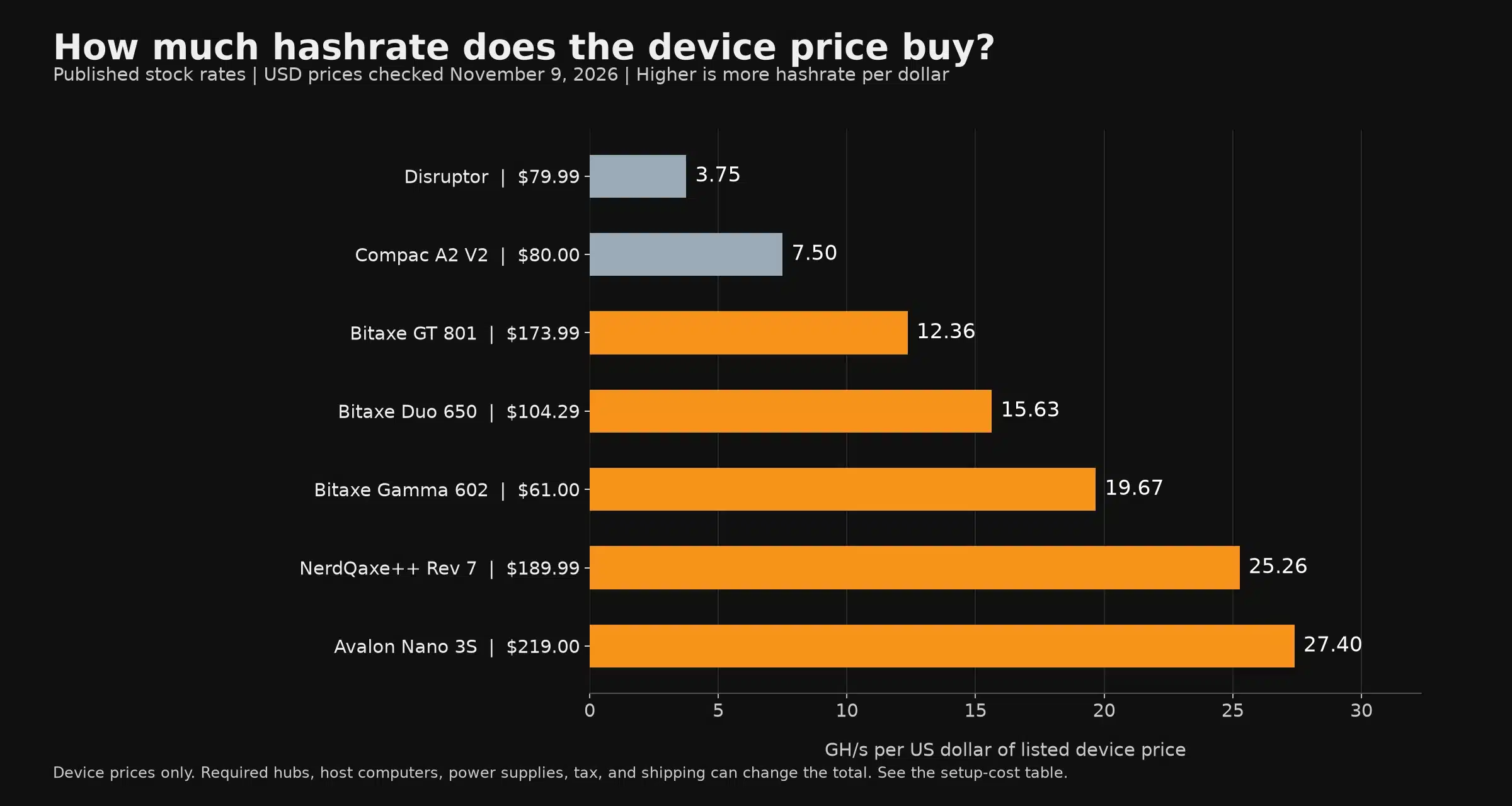
The chart uses device prices only for every row. For example, a $61 Gamma at 1,200 GH/s yields about 19.67 GH/s per device-price dollar, while an $80 Compac A2 at 600 GH/s yields 7.50. This chart does not replace the package comparison: the Gamma needs its supply, and the USB stick needs its hub and host.
For a wider shopping comparison, see our Bitcoin solo and lottery miner guide or the miners under $500. The mini miner guide covers additional form factors. This article remains focused on USB miners, their requirements, and the alternatives that address the same entry-level buying decision.
Should You Buy a USB Bitcoin Miner or a Bitaxe?
If you want an inexpensive electronics learning project, an ESP32 miner can make sense. Judge it by the educational experience and the actual board quality, rather than a jackpot promise. If you already have a USB mining rig and want to keep using its hub and software, a compatible ASIC stick can also be a reasonable specialist purchase.
If you are starting fresh and want more hashrate with fewer separate components, the Gamma 602 is the stronger value in the current comparison. Its $67 package includes the listed North American supply and delivers approximately 1.2 TH/s. That is a factual advantage over the USB examples here,. It is still a hobby miner with long solo odds, rather than an investment with a guaranteed return.
Solo Satoshi ships from Conroe, Texas, provides human support, and supplies Bitaxe miners with preinstalled AxeOS. In-stock orders placed before noon Central Time ship the same business day. Bitaxe purchases carry our six-month limited warranty, subject to the return and warranty policy. Proper power, ventilation, and operating settings still matter for every ASIC.
New to mining? Start with how to start Bitcoin mining and our explanation of solo mining. For an existing USB rig, compare what you already own before buying a second set of accessories.
Choose the right complete setup. Compare the Bitaxe Gamma 602 and power-supply options. You can also browse our Bitaxe range or all solo miners.